Welcome to Verilator
|
 |
 |
|
|
 |
 |
|
|
 |
What Verilator Does
Verilator is invoked with parameters similar to GCC or Synopsys's VCS. It "Verilates" the specified Verilog or SystemVerilog code by reading it, performing lint checks, and optionally inserting assertion checks and coverage-analysis points. It outputs single- or multithreaded .cpp and .h files, the "Verilated" code.
Verilator can automatically generate a simulator executable (using --binary), or users can write their own C++/SystemC wrapper to instantiate the model. The resulting Verilated executable performs the design simulation. Verilator also supports linking Verilator-generated libraries, optionally encrypted, into other simulators.
Verilator supports all design constructs, most verification constructs, intra-assignment delays (e.g, #10), and events. Tristate-bus (z) and unknowns (x) are handled in limited contexts, in a special manor for performance. It currently may not be the best choice if you are expecting a full-featured replacement for a closed-source Verilog simulator, performing SDF annotation, or mixed-signal simulation. However, if you are looking for a path to migrate SystemVerilog to C++/SystemC, or want high-speed simulation, Verilator is the tool for you.
Performance
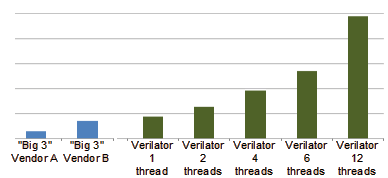
Verilator does not directly translate Verilog HDL to C++ or SystemC. Rather, Verilator compiles your code into a much faster optimized and optionally thread-partitioned model, which is in turn wrapped inside a C++/SystemC module. The results are a compiled Verilog model that executes even on a single thread over 10x faster than standalone SystemC, and on a single thread is about 100 times faster than interpreted Verilog simulators such as Icarus Verilog. Another 2-10x speedup might be gained from multithreading (yielding 200-1000x total over interpreted simulators).
Verilator has typically similar or better performance versus closed-source Verilog simulators (e.g., Aldec Riviera-Pro, Cadence Incisive/NC-Verilog, Mentor ModelSim/Questa, Synopsys VCS, VTOC, and Pragmatic CVer/CVC). But, Verilator is open-sourced, so you can spend on computes rather than licenses. Thus, Verilator gives you the best simulation cycles/dollar.
Installation & Documentation
For more information:
Support
Verilator is a community project, guided by the CHIPS Alliance under the Linux Foundation.
We appreciate and welcome your contributions in whatever form; please see Contributing to Verilator. Thanks to our Contributors and Sponsors.
Verilator also supports and encourages commercial support models and organizations; please see Verilator Commercial Support.
Open License
Verilator is Copyright 2003-2026 by Wilson Snyder. (Report bugs to Verilator Issues.)
Verilator is free software; you can redistribute it and/or modify it under the terms of either the GNU Lesser General Public License Version 3 or the Perl Artistic License Version 2.0. See the documentation for more details.