Introduction to Verilog-Mode
Written by John McNamara and Wilson Snyder.Summary
Verilog-mode.el is the extremely popular free Verilog mode for Emacs which provides context-sensitive highlighting, auto indenting, and provides macro expansion capabilities to greatly reduce Verilog coding time. It supports AUTOs and indentation in Emacs for traditional Verilog (1394-2005), the Open Verification Methodology (OVM) and SystemVerilog (1800-2005/1800-2009). Verilog-mode also allows you to insert AUTOS in non-AUTO designs, so IP interconnect can be easily modified. You can also expand SystemVerilog ".*" port instantiations, to see what ports will be connected by the simulators.Popularity
Verilog-mode.el is being used by thousands of engineers world wide. The Verilog AUTOS are in use by many of the leading IP providers, including IP processor cores sold by Arm.Examples
See the Verilog-Mode FAQ for many examples of expanding Verilog AUTOs, and the presentations under the Verilog-Mode Documentation.
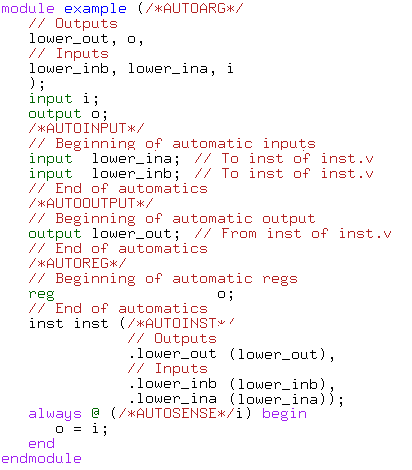
Start with a simple Verilog module in Emacs: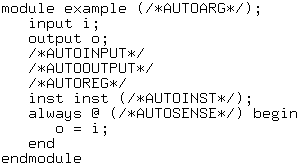 And just by installing Verilog-Mode we get syntax highlighting and
automatic indentation. Hit two keys and AUTO keywords expand.
And just by installing Verilog-Mode we get syntax highlighting and
automatic indentation. Hit two keys and AUTO keywords expand.